
BAYARAN SECARA ATAS TALIAN
Sila ikuti langkah berikut untuk melengkapkan transaksi pembayaran anda:
Please follow the steps below to complete your payment transaction:
-
Pilih Jenis Pembayaran / Select Payment Type:
Pilih sama ada anda ingin membuat Bayaran Penuh / Full Payment atau Bayaran Minimum / Minimum Payment.
Select whether you wish to make a Full Payment or Minimum Payment.
-
Semak Jumlah Pembayaran / Verify Payment Amount:
Pastikan jumlah pada ruangan Jumlah / Amount (RM) adalah betul.
Ensure the amount in the Amount (RM) field is correct.
-
Peringatan Pop-up / Pop-up Reminder:
NOTA / NOTE: Pastikan tetapan pelayar (browser) anda membenarkan pop-up bagi membolehkan halaman perbankan dibuka.
Ensure your browser settings allow pop-ups so that the banking page can be opened.
-
Teruskan Pembayaran / Proceed to Pay:
-
Klik butang "Teruskan Bayaran FPX / Proceed FPX Payment" atau "Teruskan Bayaran Kad Kredit/Debit/ Proceed Credit Card/Debit Payment" untuk dihubungkan ke portal perbankan anda.
Click the "Proceed FPX Payment" atau "Proceed Credit Card/Debit Payment" button to connect to your banking portal.
-
Atau klik butang "Batal / Cancel" sekiranya anda mahu membatalkan transaksi ini.
Or click the "Cancel" button if you wish to cancel this transaction.
-
BAYARAN DENGAN FPX / PAYMENT VIA FPX
Sila ikuti langkah berikut untuk melengkapkan pembayaran:
Please follow the steps below to complete your payment:
-
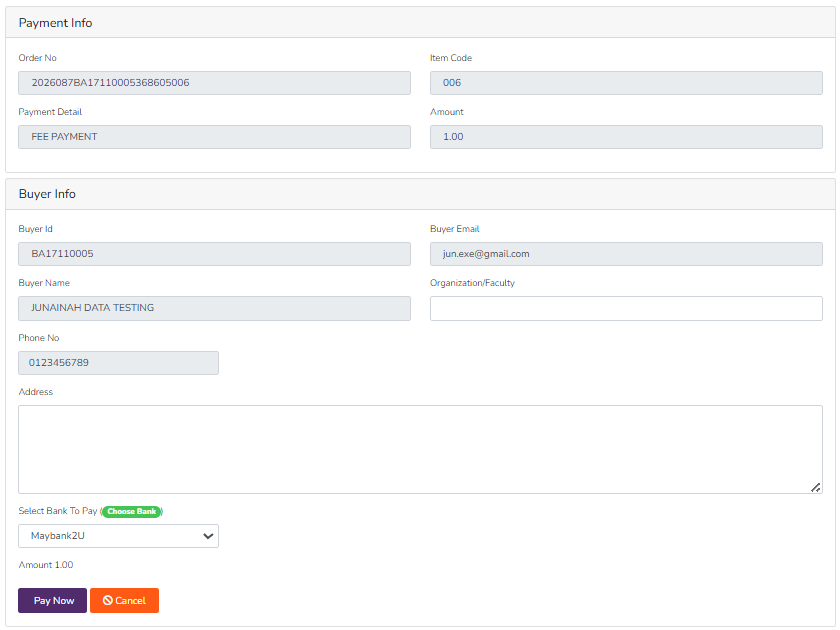
Akses UMS ePAYMENT / Access UMS ePAYMENT:
Anda akan dibawa ke laman UMS ePAYMENT. Sila pilih bank yang disenaraikan.
You will be redirected to the UMS ePAYMENT page. Please select a bank from the list provided.
-
Teruskan ke Halaman Bank / Proceed to Bank Page:
Tekan butang "Pay Now" dan anda akan dibawa ke halaman perbankan pilihan anda untuk melengkapkan transaksi.
Click the "Pay Now" button and you will be directed to your selected bank page to complete the transaction.
BAYARAN DENGAN KAD KREDIT / DEBIT (CREDIT / DEBIT CARD PAYMENT)
Sila ikuti langkah berikut untuk melengkapkan pembayaran:
Please follow the steps below to complete your payment:
-
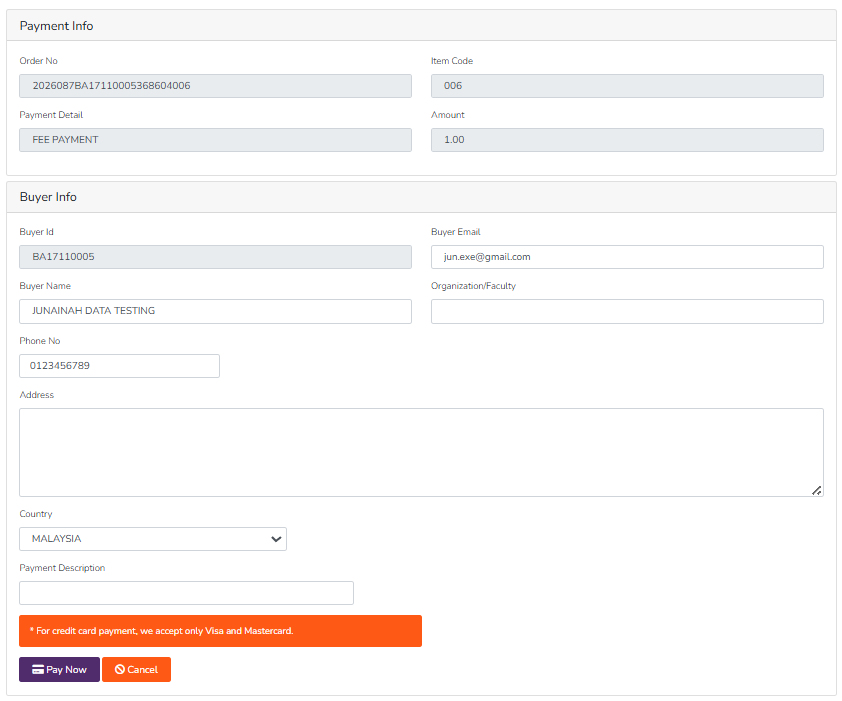
Akses UMS ePAYMENT / Access UMS ePAYMENT:
Anda akan dibawa ke laman UMS ePAYMENT.
You will be redirected to the UMS ePAYMENT page.
-
Teruskan ke Halaman Pembayaran / Proceed to Payment Page:
Tekan butang "Pay Now" dan anda akan dibawa ke halaman pembayaran bank untuk memasukkan maklumat kad anda dan melengkapkan transaksi.
Click the "Pay Now" button and you will be directed to the bank's payment page to enter your card details and complete the transaction.
No comments to display
No comments to display